> ## Documentation Index
> Fetch the complete documentation index at: https://beebole.com/llms.txt
> Use this file to discover all available pages before exploring further.
# Time Export
> Beebole legacy API — Time Export operations.
This section deals with the retrieval of timesheet entries.
The API uses the following two services in order to retrieve time records:
* The service **time\_entry.export** initiates and launches an export job. This job is queued and processed in the background. The service’s response will be a new job object. The job object is composed of a unique ID, its status, and, if it has been completed, a result.
* If the previous service doesn't respond with a result, the service **time\_entry.get\_job\_info** will be used to query the job status and get the final result. As for the export service, it will return a job object.
How to use those services:
1. call the service **time\_entry.export** to initiate a new export job and receive a new job ID.
2. call the service **time\_entry.get\_job\_info** periodically (every 5 sec) in order to check if the job has been done and if the response contains a result. You should exit the loop on a service status or a job.status == “error”, or when the job.status == “done” and job.result is of type string.
## **Export Time Entries**
This service initiates a new export job. This job is queued and processed in the background.
The service wraps the in app export module functionality.
\*\*Parameters: \*\*
* **“from"** and **"to”**
* **“show”** and **“keys”**: these two parameters are linked. The “show” parameter represents what kind of report you want to get. Depending on the “show” parameter, you will adapt the “keys” parameter, which represents the columns you want to export.
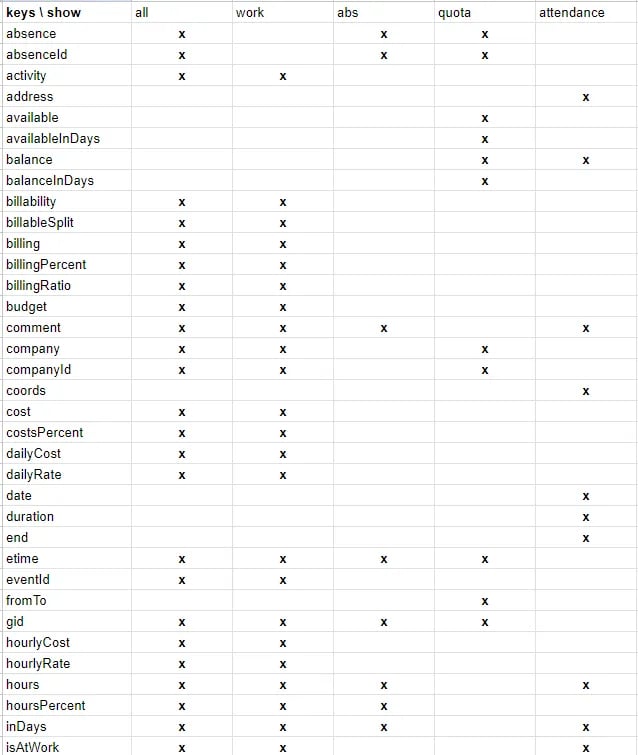
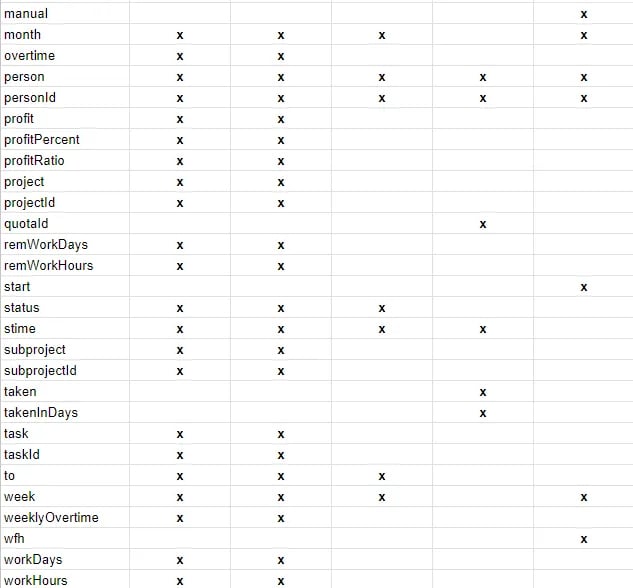 * **“statusFilters”**: this represents the time record filter.
\[**d**]raft, \[**s**]ubmitted, \[**a**]pproved, \[**r**]ejected, \[**l**]ocked
* **“gids”**: this represents the groups filter, and array of integer group IDs.
* **“outputFormat”: “array”**: this parameter is optional. It allows you to export the result as an array of arrays instead of CSV.
Request:
```json theme={null}
{
"service": "time_entry.export",
"from": "2017-10-01",
"to" : "2017-10-30",
"show" : "all", // Optional default "all"
"keys" : ["company", "companyId", "hours"],
"statusFilters" : ["l", "a"], // optional
"company":{ "id":8695 }, // optional to filter the data for a specific and single entity
// accept "company", "project", "subproject", "person", "task", "absence"
"gids" : [4588,8977], //optional
"outputFormat" : "array" // optional to get results as array of arrays (If not defined, the output will be CSV)
}
```
Response:
```json theme={null}
{
"status":"ok",
"job": {
"status":"running",
"id":1148
}
}
```
## **Get Job Info**
Request:
```json theme={null}
{
"service":"time_entry.get_job_info",
"id":1148,
"outputFormat" : "array" // optional to get results as array of arrays (If not defined, the output will be CSV)
}
```
Response:
```json theme={null}
{
"status":"ok",
"job": {
"status":"running",
"id":1148
}
}
```
OR if it’s done
Response:
```json theme={null}
{
"status":"ok",
"job": {
"status":"done",
"id":1148,
"result":"Entreprise,Heures\nBranch,\"7,000\"\nMyCompany,\"63,000\"\n ..."
}
}
```
The Beebole customer and IT advisory Taptu shares their insights on custom integrations.
* **“statusFilters”**: this represents the time record filter.
\[**d**]raft, \[**s**]ubmitted, \[**a**]pproved, \[**r**]ejected, \[**l**]ocked
* **“gids”**: this represents the groups filter, and array of integer group IDs.
* **“outputFormat”: “array”**: this parameter is optional. It allows you to export the result as an array of arrays instead of CSV.
Request:
```json theme={null}
{
"service": "time_entry.export",
"from": "2017-10-01",
"to" : "2017-10-30",
"show" : "all", // Optional default "all"
"keys" : ["company", "companyId", "hours"],
"statusFilters" : ["l", "a"], // optional
"company":{ "id":8695 }, // optional to filter the data for a specific and single entity
// accept "company", "project", "subproject", "person", "task", "absence"
"gids" : [4588,8977], //optional
"outputFormat" : "array" // optional to get results as array of arrays (If not defined, the output will be CSV)
}
```
Response:
```json theme={null}
{
"status":"ok",
"job": {
"status":"running",
"id":1148
}
}
```
## **Get Job Info**
Request:
```json theme={null}
{
"service":"time_entry.get_job_info",
"id":1148,
"outputFormat" : "array" // optional to get results as array of arrays (If not defined, the output will be CSV)
}
```
Response:
```json theme={null}
{
"status":"ok",
"job": {
"status":"running",
"id":1148
}
}
```
OR if it’s done
Response:
```json theme={null}
{
"status":"ok",
"job": {
"status":"done",
"id":1148,
"result":"Entreprise,Heures\nBranch,\"7,000\"\nMyCompany,\"63,000\"\n ..."
}
}
```
The Beebole customer and IT advisory Taptu shares their insights on custom integrations.